Download Receipt
This API enables third-party systems or apps to integrate Download Receipt into their systems via CellPay.
The Download Receipt API requires two path parameters: transferTypeId and transactionId. Both parameters must be accurately mapped to ensure the correct transaction receipt is retrieved.
The transferTypeId represents the type of fund transfer associated with the transaction.
Example:
Wallet-to-Bank transfer → transferTypeId = 50
Other transfer types may have different identifiers depending on the integration scope and business configuration. Developers are responsible for maintaining a proper mapping of transfer types to their corresponding IDs within their system.
The transactionId must be the exact identifier returned from the initiateTransaction or any equivalent transaction-creation API. This ID uniquely identifies the transaction in the CellPay system and is required for all follow-up operations, including payment confirmation and receipt download. For instance, if the transaction initiation API returns "transactionId": 138345, that same value must be used when calling the Download Receipt API.
Incorrect or mismatched values for transferTypeId or transactionId may result in request failure, retrieval of an incorrect receipt, or unintended transaction behavior. Always ensure both parameters correspond to the same transaction and transfer type before invoking this API.
Endpoint:
{base-url}/payments/details/download/{transferTypeId}/{transactionId}
Method: GET
Request Headers:
The following HTTP headers are required when calling the API:
Content-Type: application/json
Cellpay-Access-Token: {{accessToken}}
Download Receipt – Response Example
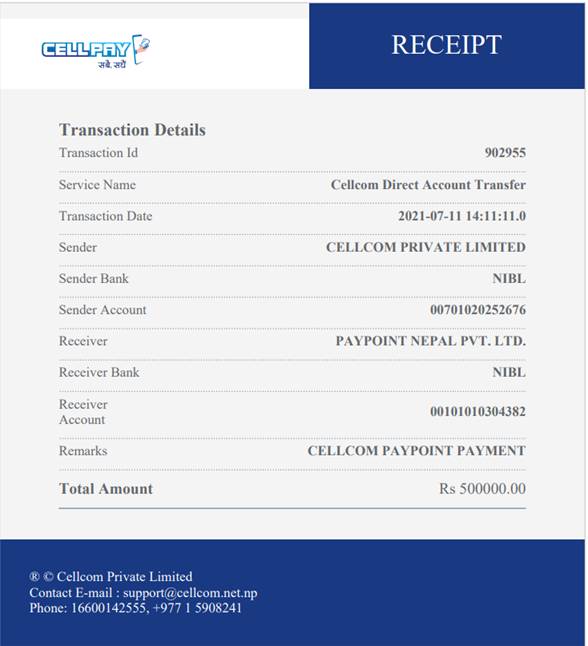
This api is to get response as json format.
Endpoint:
{base-url}/payments/details/{transferTypeId}/{transactionId}
Method: GET
Request Headers:
The following HTTP headers are required when calling the API:
Content-Type: application/json
Cellpay-Access-Token: {{accessToken}}
Download Receipt – Response Example
{
    "status": true,
    "sessionExpired": false,
    "payload": {
        "paymentDetails": {
            "{{paymentDetailsObject}}"
        }
    }
}